
01
Create
Write rich documents with formatting, images, tables, links, and export.
Zerus brings your documents, notes, and texts together in a personal workspace so you can organize your knowledge, return to your ideas with context, and work better with AI.
Visual concept · sample data
 Gemini
 OpenAI
 Claude

 OpenRouter
The Dashboard, documents, folders, quick notes, and reviews offer complementary ways to continue your work. The experience stays calm and clear while connections between materials evolve gradually.
Write rich documents with formatting, images, tables, links, and export.
In supported flows, use Contextual AI to review, summarize, and translate texts.
Organize documents and notes with Folders, Quick Notes, Kanban, and Reviews.
Return through the Dashboard, scheduled Reviews, Folders, or Kanban cards.
Write full documents in the browser and use AI to review, rewrite, translate, and improve passages without leaving the flow.
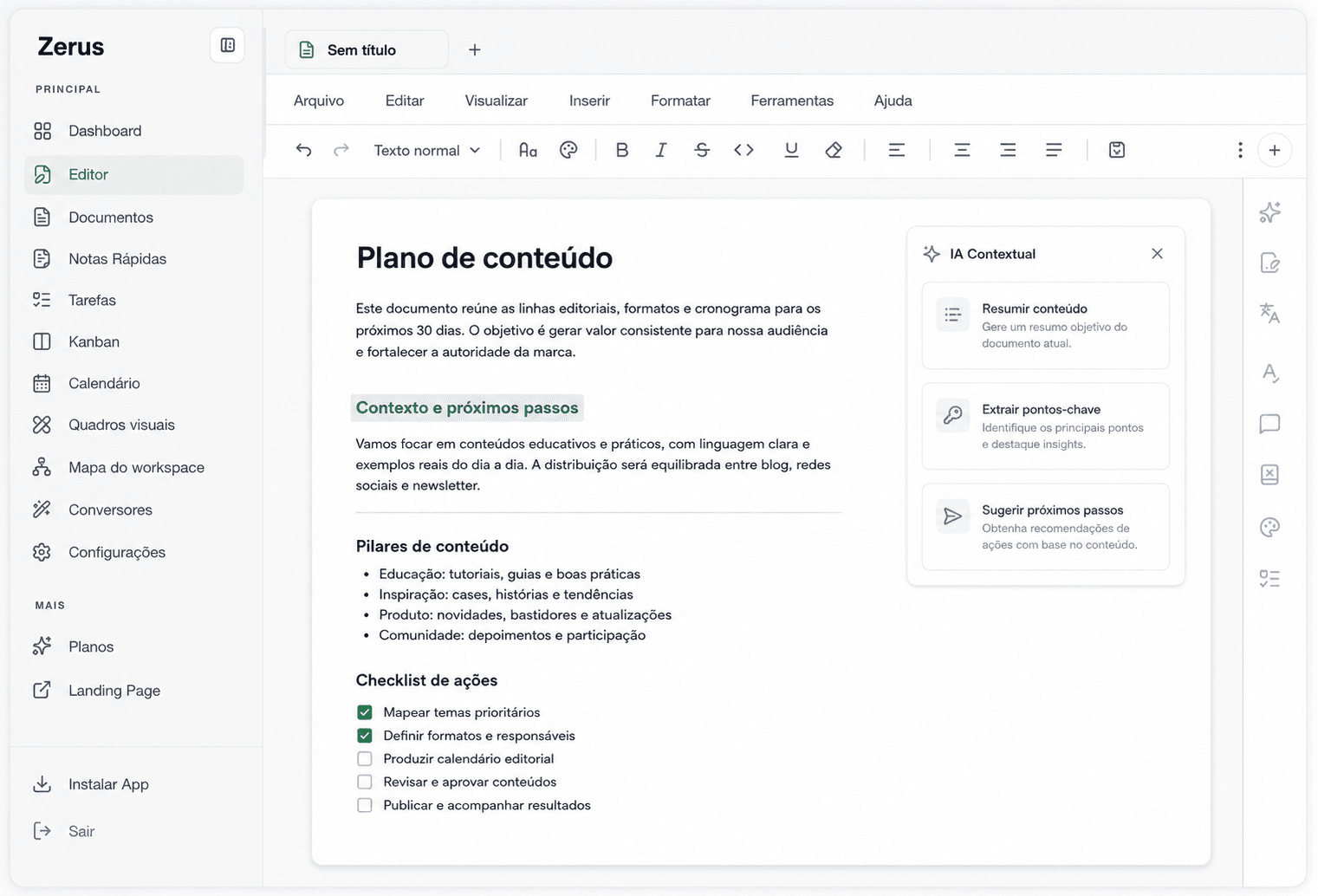
Organize text by topic, project, study, or life area. Find and revisit materials more easily.
Capture ideas, reminders, excerpts, and thoughts before they disappear. Then turn notes into more structured text.
Schedule document and note reviews so you can return at the right time, especially for study, projects, and recurring work.
Organize texts, notes, and documents by status. Plan what is in idea, in progress, review, or done.
Turn files and media into editable documents so you can keep working on the content inside Zerus.
Talk to AI about the content you are working on and get help to create, summarize, adapt, and improve it.
Keep style, tone, audience, and personal instructions so responses stay aligned with the way you write.
In supported flows, Zerus uses relevant context to rewrite, review, translate, summarize, or answer questions. Preferences and your Personal Brand Kit can guide specific experiences while the scope remains clear and under your control.
Explore features

Loose notes, documents spread across different apps, and isolated AI tools break the flow. The overload is not a lack of intelligence; it is the lack of one place to organize materials and continue the work.
Start with a text, document, note, idea, or converted file.
Rewrite, translate, review, summarize, ask, or transform the content into another format.
Use folders, tags, cards, calendar, and reviews to add context to the material.
Come back through the dashboard, a scheduled review, a card, or a folder.
As the workspace grows, Zerus gets closer to a second brain for your texts and ideas.


Organize class materials, summarize texts, review essays, prepare study sessions, and follow reviews in one workspace.
Create reports, proposals, messages, and recurring documents with AI support and an organized library.
Turn ideas into articles, adapt text to different tones, review content, and keep assignments moving.
Keep notes, sources, summaries, and documents to build a personal knowledge base.
Capture ideas, develop reasoning, and return to important text without depending on memory or scattered files.
Second brain is Zerus's long-term direction: helping you remember, connect, and reuse accumulated knowledge. It is not a complete current capability; it depends on gradual evolution, controlled context, privacy, and evidence of value.
Start with a document or quick note, then use the available tools to write, organize, and return to your work.
Pricing
For people just getting started
For daily AI usage
For advanced AI and Brand Kit
Features, AI credits, and limits vary by plan and supported flow. Review the details before confirming an upgrade.
Zerus is a personal workspace for writing and knowledge. It combines a text editor, folders, quick notes, reviews, Kanban, converters, and contextual AI.
Yes. The rich editor is central to Zerus and works alongside folders, quick notes, reviews, Kanban, and other ways to revisit your work.
Contextual AI helps rewrite, translate, summarize, review, and adapt text based on the content in progress and your personal Brand Kit.
Yes. Zerus centralizes documents, quick notes, and text materials in folders, cards, reviews, and return flows.
Yes. Students can organize materials, summarize texts, and follow reviews. Professionals can create reports, proposals, and outlines with AI support and an organized library.
Second brain is the long-term vision of the product: helping people remember, connect, and reuse knowledge from the texts, documents, and notes they add to the workspace.